Lifecycle of a Data Transfer
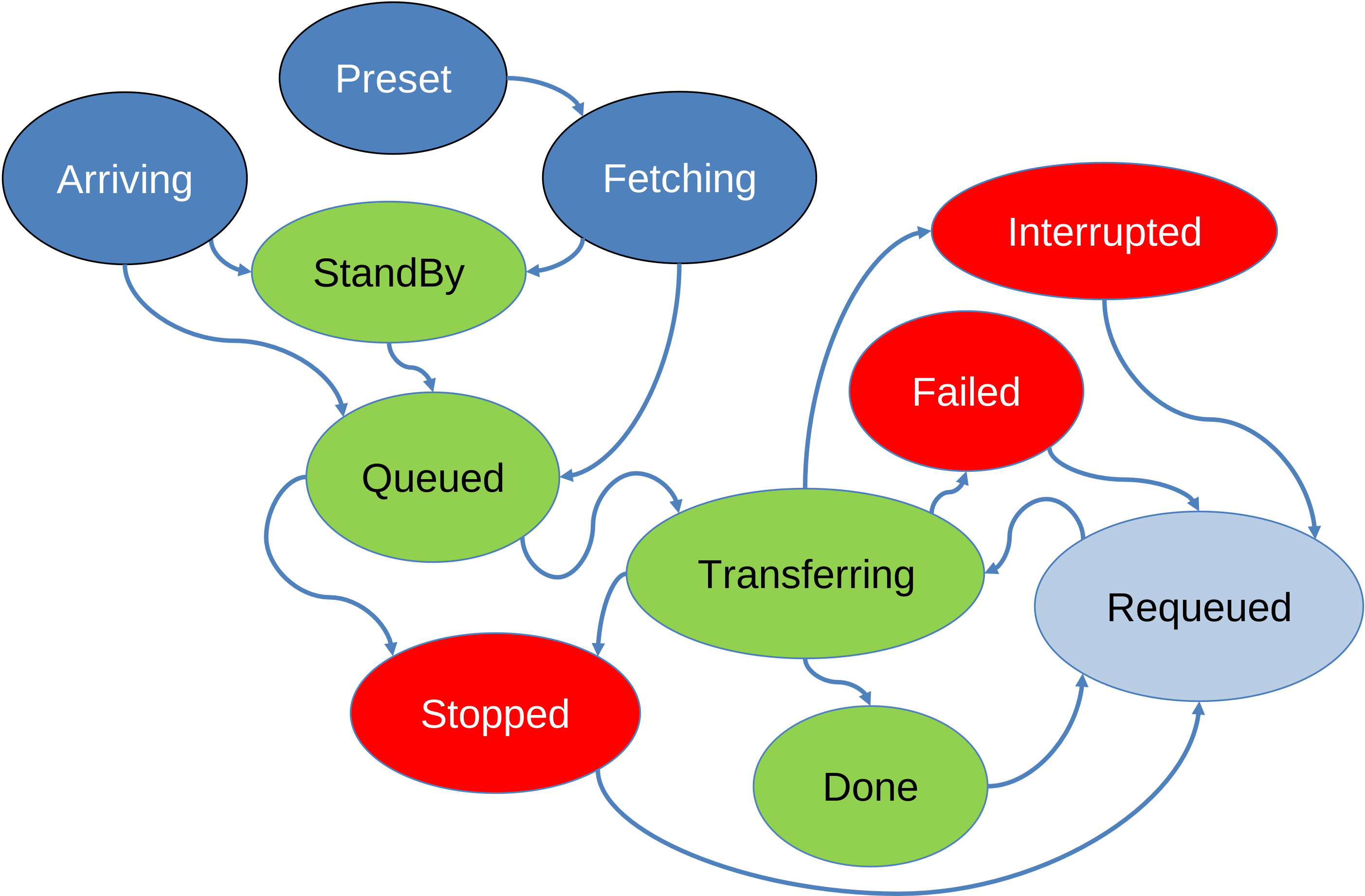
Each data transfer in OpenECPDS follows a well-defined lifecycle, transitioning through different statuses from initiation to completion — including successful deliveries, retries, and failure handling. Understanding these transitions helps in diagnosing issues, optimising performance, and ensuring reliable data distribution across the system.
Submission
This phase involves submitting a data file to the OpenECPDS Data Store and registering a data transfer request for it. There are two submission modes, each with its associated statuses.
Push Mode
Both the metadata and the file content are pushed directly.
- Arriving — The metadata has been registered, and the file content is currently being uploaded to the Data Store.
Fetch Mode
The metadata is submitted first, and the file content is retrieved asynchronously.
- Preset — The metadata has been registered, and the data retrieval has been scheduled, awaiting processing by the Data Retrieval Scheduler.
- Fetching — The Data Retrieval Scheduler is actively retrieving the file content into the Data Store.
Processing
Once a data transfer request has been registered, it is processed by various schedulers and transitions through multiple statuses. The associated data file can either be downloaded through the Data Portal or disseminated to a remote site. Each mode has its own set of statuses.
Data Portal
The file is in the destination queue, waiting to be retrieved.
- StandBy — The data transfer request was submitted with the standby option, causing it to be ignored by the Data Transfer Scheduler.
- Done — The data file has been successfully downloaded.
Dissemination to a Remote Site
The data transfer request is in the queue, waiting for the scheduled time to pass.
- Queued — The data transfer request is waiting to be picked up by the Data Transfer Scheduler.
- Transferring — The data is currently being disseminated to the remote site.
- Done — The data transmission has been successfully completed.
Failure Handling
At every stage of processing, an error can occur. When an error occurs, the data transfer request is assigned a specific status depending on the nature of the error. Once the error has been recorded, the transfer scheduler has two options: either retry the request or remain in the error state, depending on the destination or host configuration (e.g., maximum number of retries, unrecoverable error).
Error State
The file has failed to complete the processing phase successfully.
- Failed — The dissemination to the remote site has failed.
- Interrupted — The processing has been interrupted (e.g., destination or OpenECPDS restart).
- Stopped — The processing was stopped either manually through the monitoring interface, due to an unrecoverable error, or because the maximum number of retries was reached.
Retry The Request
Automatic or manual.
- Requeued — The file has entered an error state but was requeued because the error was not considered unrecoverable. A file can also be manually requeued by a user through the monitoring interface. In the case of an automatic retry, the file can be rescheduled for a later time to prevent retries from occurring too frequently. A maximum number of retries can also be configured, with settings available at both the destination and host levels.
Related
- Failover Mechanism
- Event Logging — records the outcomes of these transitions.
- OpenECPDS Entities