Destinations
A Destination is the core scheduling unit in OpenECPDS. It represents a named data feed — either a dissemination target (data is pushed to it) or an acquisition source (data is pulled from it). Each destination has a queue of transfer requests, one or more associated hosts, and a set of options that control scheduling behaviour.
Destination List
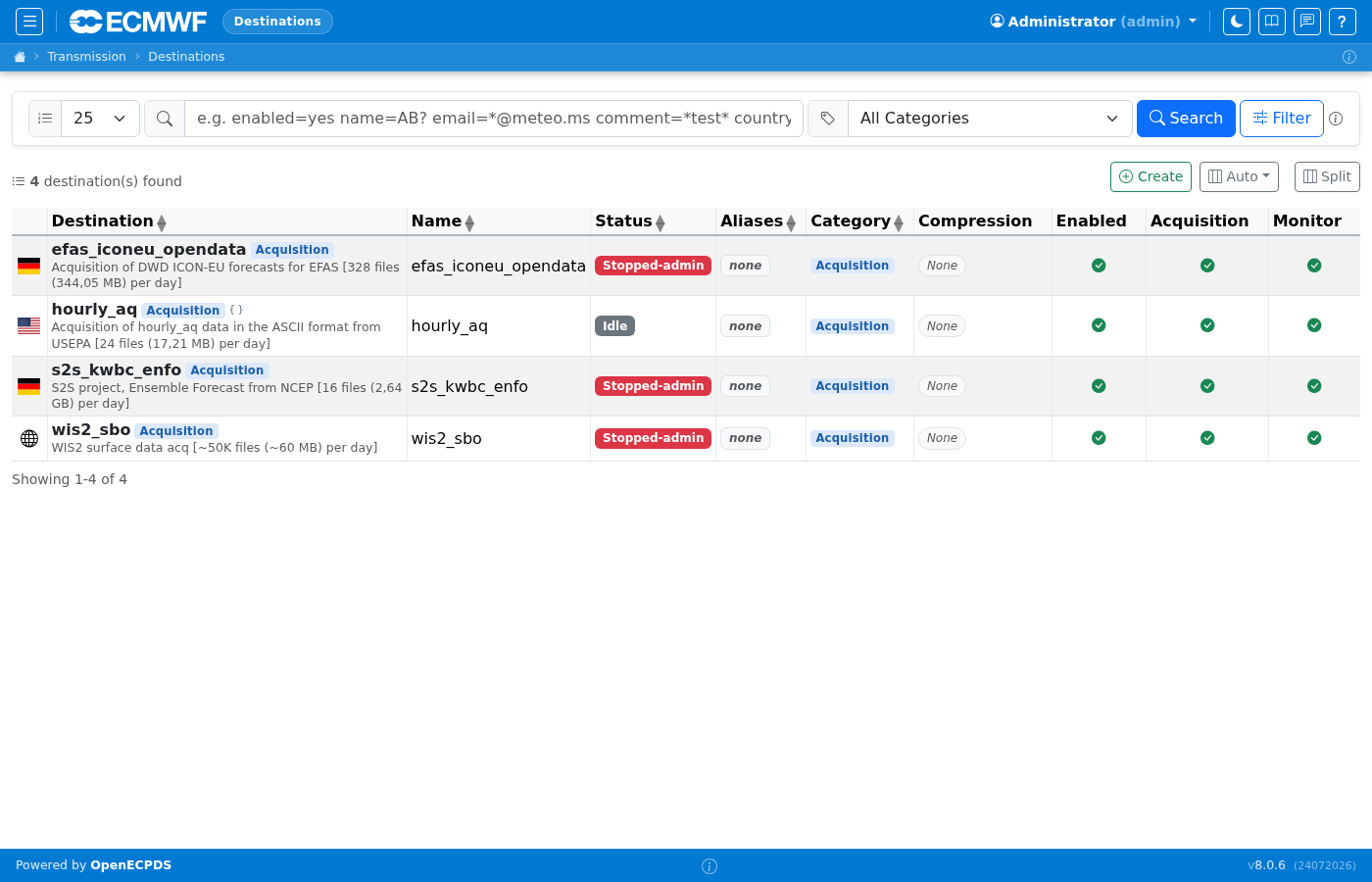
The destination list shows all configured destinations with their type (Acquisition, Dissemination, Time Critical, or any custom type defined in the server configuration), status (active/stopped/held), queue depth, and last transfer time. Click a destination name to open its detail page.
Standalone container
All four sample destinations (efas_iconeu_opendata, hourly_aq, s2s_kwbc_enfo, wis2_sbo) are of type Acquisition — they pull data from external sources.
Destination Detail
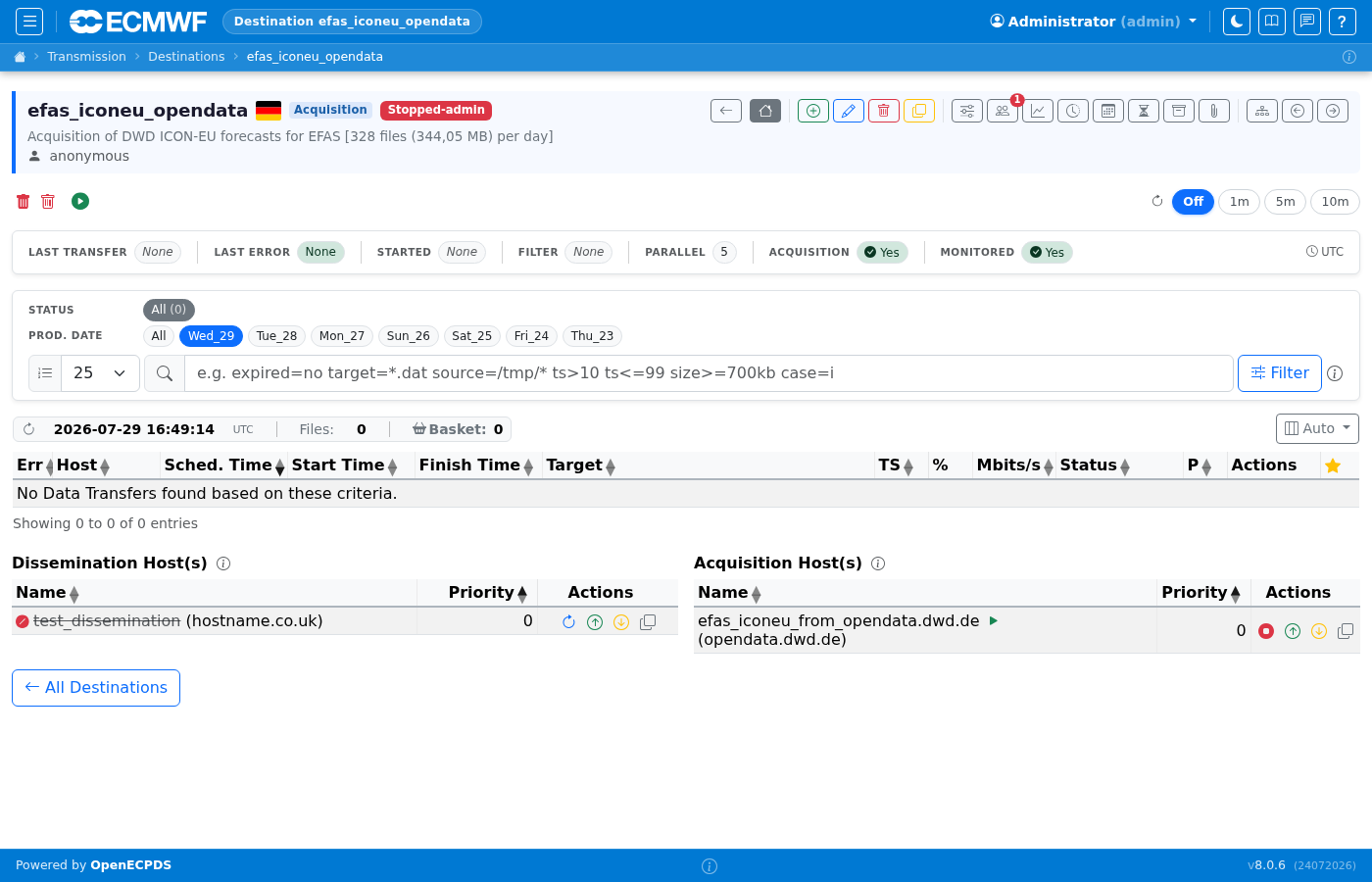
The destination detail page shows the current queue for that destination: pending, running, done, and failed transfers. The toolbar provides actions to hold, release, flush, or reconfigure the destination. The Properties tab shows the destination's scheduler and incoming options.
Host activity and discovery
The Dissemination Host(s) and Acquisition Host(s) sections have an i button that expands an explanation of their scheduling, indicators and limits. The information/warning icon beside each Host name explains that Host's limit scope and the upper bound for this Destination.
| Indicator | Meaning |
|---|---|
| Steady green dot | The Host is enabled, not necessarily reachable or healthy. |
| Disabled symbol and struck-through name | The Host is administratively disabled. |
| Pulsing green dot | Counted outgoing transfer activity for dissemination, or counted Master-scheduled retrieval activity for acquisition. |
N active | This Destination's active outgoing transfers on that dissemination Host. |
selected with retry usage | The dissemination Host selected for new dispatches, with its current Host retry usage. |
N retrieving | This Destination's active Master-scheduled retrieval jobs through that acquisition Host. |
| Discovery running/stop indicator | A directory-listing and file-discovery cycle is running; this is separate from file retrievals. |
Counts represent scheduled jobs, not physical sockets. Zero-count activity pills are hidden. For a shared acquisition Host limit, the retrieval pill's tooltip also shows combined Host slot usage across Destinations on the same Master.
Dissemination uses Host priority and failover settings. Lower priority numbers take precedence, but the scheduler can remain on a working fallback Host rather than returning to the primary for every transfer. The selected Host receives new dispatches; transfers already running on another Host can still finish there.
Acquisition discovery lists remote directories and evaluates entries against the Host's rules. Eligible Hosts are processed independently and can run in parallel, subject to acquisition timing and scheduler capacity; the Priority column does not create an acquisition failover chain. Users with the required permission can use the play button to request discovery now, or the stop button to interrupt the current discovery cycle. Stopping discovery does not cancel retrievals already scheduled or running. Network Weather probes are separate from both discovery and file retrieval.
File retrieval is scheduled separately for files selected for queueing. Host and Destination connection limits apply to Master-scheduled acquisition, along with the download scheduler's pool limit. The Destination maximum caps retrievals and outgoing dissemination as two independent pools: a setting of 5 allows up to 5 retrievals and 5 outgoing transfers, not 5 combined. Directory listings, probes and idle connections are excluded. Mover-side on-the-fly recovery of a missing file bypasses the acquisition limits and retrieval pill, while an outgoing transfer served by that recovery still occupies its dissemination slots. See File-transfer connection limits.
On acquisition Destinations, Host status is refreshed approximately every four seconds while the page is visible. On dissemination-only Destinations it is loaded when the page opens. If a status request fails, stale activity badges are replaced with an unavailable warning and activity pulsing stops; this means status is unknown, not that the Host is idle or down.
Editing a Destination
The edit form groups settings into Identity, Delivery, Limits, Directory, Notifications, Flags and Options, alongside Host, user, policy, alias and metadata associations. Each card's i button expands contextual help in the shared neutral panel with a blue top border. Field-level ? tips explain individual settings.
The Max Connections tip and Limits information panel explain the independent retrieval and dissemination pools. Enabled controls scheduler participation; Show In Monitor controls visibility rather than enabling or disabling work. Acquisition requires both the Acquisition flag and an associated Acquisition Host. The Directory card controls the date-directory view for incoming FTP/SFTP users, not remote acquisition listing paths or dissemination target paths.
Use the Limits & Failover Guide in Delivery or Limits for concurrency, Host retry budgets, Destination holds, individual transfer delays/failures and queue troubleshooting. See also Destination retry controls. The Alias Routing Guide in Destination Aliases explains outgoing link direction, fan-out, chains and conditional routing. Use the detail page's Aliased From, Aliases To and alias diagram to check routing relationships before changing them; see Aliases. Options provides a separate Properties Reference for supported option keys and defaults. Guide buttons retain their full accessible names when displayed as book-only controls on small screens.
Change Log
The Change Log records Destination settings and Host changes made through authenticated Master session actions, with the user and time of each successful change. Host entries distinguish allocation, removal, priority changes, global enable/disable and global deletion. Copying a Host into a Destination or copying a Destination also records the resulting Host allocations. Backup imports through the API record allocations with an API/<client ID> actor, never the API secret.
An enable/disable or deletion of a shared Host appears in every Destination associated with it at the time of the action, not only the Destination from which the action was requested. Entries retain the Host ID, nickname, address and Destination-specific priority, so removing or deleting the Host does not erase that identity. These snapshots do not include Host credentials.
Host events show vs Previous only: comparing an association or a global Host state with the current Destination settings would be misleading. Ordinary Destination settings retain both comparison tabs. Unchanged priorities/states and failed actions do not create Host-change entries. History starts when this version is deployed; previously unrecorded changes cannot be reconstructed. The existing anonymous-user and dontRecordActions exclusions still apply. As with existing settings history, database recording failures are logged but do not roll back a completed configuration change.
Transfer Timeline search
The destination's Timeline has a shared Search transfers box for Chart and Table views. It filters as you type, ignoring case, by target filename/path, label (cycle-product-type), status code or host name. Enter one word or phrase, for example GENFO, .grib, a host name, or RETR for retrying transfers. Other status codes include DONE, EXEC and STOP.
The i button beside the box explains the search with examples. Matching is literal: wildcards, regular expressions and comma-separated lists are not supported. Clear the box or use × to restore all transfers. The matching count is shown in both views; switching views keeps the search, and CSV exports only matching transfers. Changing the search resets chart zoom.
Transfer tries
Choose Cols → Custom → Tries to show the number of attempts to reach each transfer's current status, using the same count as the destination timeline: requeues plus one. A value of 1 means no requeue. The column supports numeric sorting and is hidden by default; it is available only in Custom mode.
Delivered filename
Target remains the requested filename. Host settings can change the filename or path actually used by a delivery module. The transfer detail page shows Delivered name when the module reports a different name after successful delivery. It is shown only for transfers whose current status is DONE. The display falls back to Target when no different name is recorded. Comparison is exact and case-sensitive; names are not inferred from comments.
In the destination queue, choose Cols → Custom and enable Delivered to display it immediately after Target. The column is not included in Auto, All, Compact or Small modes. Existing saved column selections are preserved.
Use delivered=*/in/* to search this field, or combine it with other conditions, for example target=*.dat delivered=archive/* case=i. Wildcards, quoting and case= work as for target=. The same filter applies to transfer rows, counts and filtered basket selection. Only DONE transfers match delivered=. When their stored delivered name is NULL, delivered= searches Target instead. Sorting uses the same effective filename. This does not change stored values. Failed, queued, running and other non-DONE transfers show an empty Delivered value and do not match a delivered filename filter, even if an older name remains stored. Historical DONE transfers and modules that do not report a name use the Target fallback; this does not recover an unrecorded historical remote filename.
The field describes the latest delivery attempt, not a history of remote names. It is cleared when a new Mover delivery attempt starts and populated on success. Historical transfers are not backfilled.
Recording the name uses the existing transfer update path: there is no additional database request per transfer or parsing of history messages. No index is added for the new text field. Searching or sorting it can cost more on large result sets; destination and time/status filters still constrain the existing queries.