MQTT Notification System
OpenECPDS integrates both an MQTT Broker and an MQTT Client to enhance data dissemination and acquisition workflows.
- The MQTT Broker — enables users of the dissemination service to subscribe to notifications, ensuring they are alerted as soon as new products become available in the Data Store. This allows for efficient and automated downstream processing.
- The MQTT Client — facilitates data acquisition by registering with external data providers. When new data becomes available, the client processes the received notifications and automatically retrieves the data into the Data Store, ensuring seamless integration with external sources.
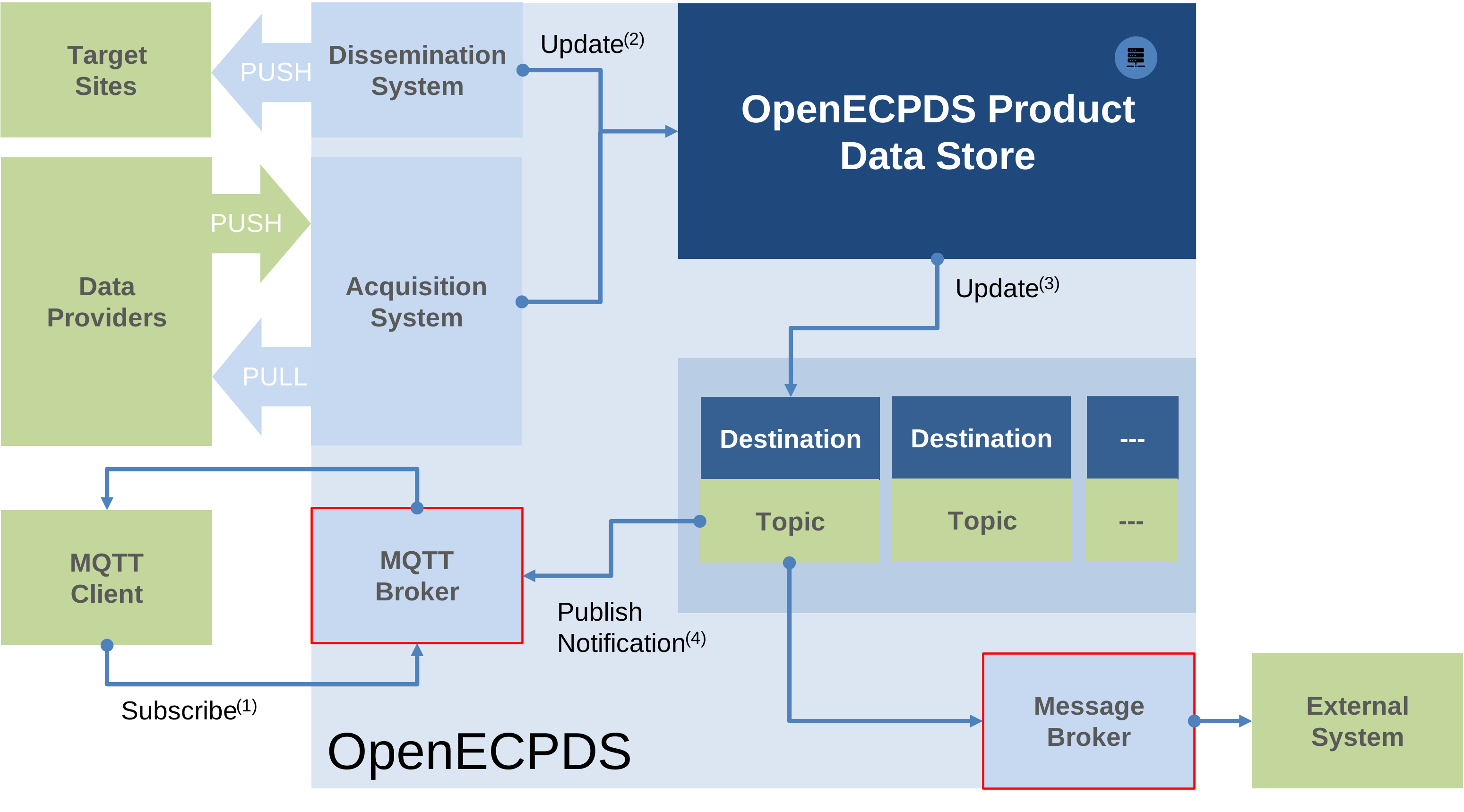
By supporting MQTT, OpenECPDS improves real-time data distribution and acquisition, enhancing overall system efficiency and responsiveness. Notifications are sent instantly when new data becomes available, allowing for immediate processing and reducing delays.
Understanding MQTT concepts using a filesystem analogy
Let's use a filesystem analogy to explain MQTT topics, wildcards, and the retain flag.
Imagine a directory structure where you can register interest in files stored within a specific directory, or even within that directory and all its subdirectories. To do this, you specify the full path of the directory. MQTT works similarly, but instead of file paths, we use topics. Topics allow clients to subscribe to messages, and they can include wildcards to match multiple levels:
+(single-level wildcard): Matches any one directory level.#(multi-level wildcard): Matches everything from that point downward in the hierarchy.
Instead of files, MQTT deals with notifications, each carrying a payload. This payload may contain the actual data (like the file itself) or a link (href) that allows the subscriber to retrieve the content elsewhere. These notifications are published by a data provider that wants to share information, and each one is sent to a specific topic.
Now, let's go back to our filesystem analogy. If a file is saved again in the same directory with the same name, the previous version is overwritten and lost. There is no way to retrieve the old file unless:
- The directory name includes a timestamp or version number.
- The file itself has a unique name with a timestamp or version number.
With MQTT, the same principle applies: if the topic name includes a timestamp or unique identifier, each notification remains distinct, allowing subscribers to access different versions.
Retained Messages in MQTT
A key feature of MQTT is the retain flag. When a message is published with this flag enabled, it remains available for new subscribers, even if they connect later. This ensures that when a subscriber reconnects, it immediately receives the most recent retained message for that topic.
However, retained messages do not provide a history log; only the most recent retained message is stored. If a subscriber disconnects and multiple messages are published in the meantime, it will not receive all missed messages upon reconnecting. For true message history, persistent sessions with QoS 1 or QoS 2 should be used instead.
That said, if a topic includes a timestamp or unique identifier, it can function as a form of history log. Each message is stored under a distinct topic (e.g., forecasts/data/20250320T1200), allowing clients to subscribe to specific time-based patterns to retrieve past messages.
Additionally, MQTT 5.0 introduces message expiration. Once a message expires, it is automatically deleted from the broker, ensuring outdated information is not delivered.