Data Portal
The ftp, sftp, scp, s3, and wget/curl command-line tools can be used to transfer data to and from OpenECPDS. These standard tools facilitate connections and file transfers via the OpenECPDS Data Portal. This page examines the workflow for uploading and downloading files using these methods.
Cancelled HTTPS downloads
If a client or intermediary closes a connection during a download, the Mover records Jetty's connection EOF as a short debug message instead of a Jersey HTTP 503 stack trace. This does not mean the download completed; the client must retry or resume it. Frequent cancellations warrant checking client/proxy timeouts and network stability. Other streaming I/O failures remain reported normally.
Data Mover roles
In these workflows:
- The User Data Mover is the server where the customer connects using FTP, SFTP, SCP, HTTPS, WebDAV or S3 to upload or download a file.
- The Target Data Mover is the server where the file is stored.
In a multi-mover setup:
- The User Data Mover is selected by a Load Balancer, which distributes requests across available Data Movers.
- The Target Data Mover is allocated by the Master Server, considering available storage and system load.
Thus, the User Data Mover and Target Data Mover may not be the same.
Synchronous Push
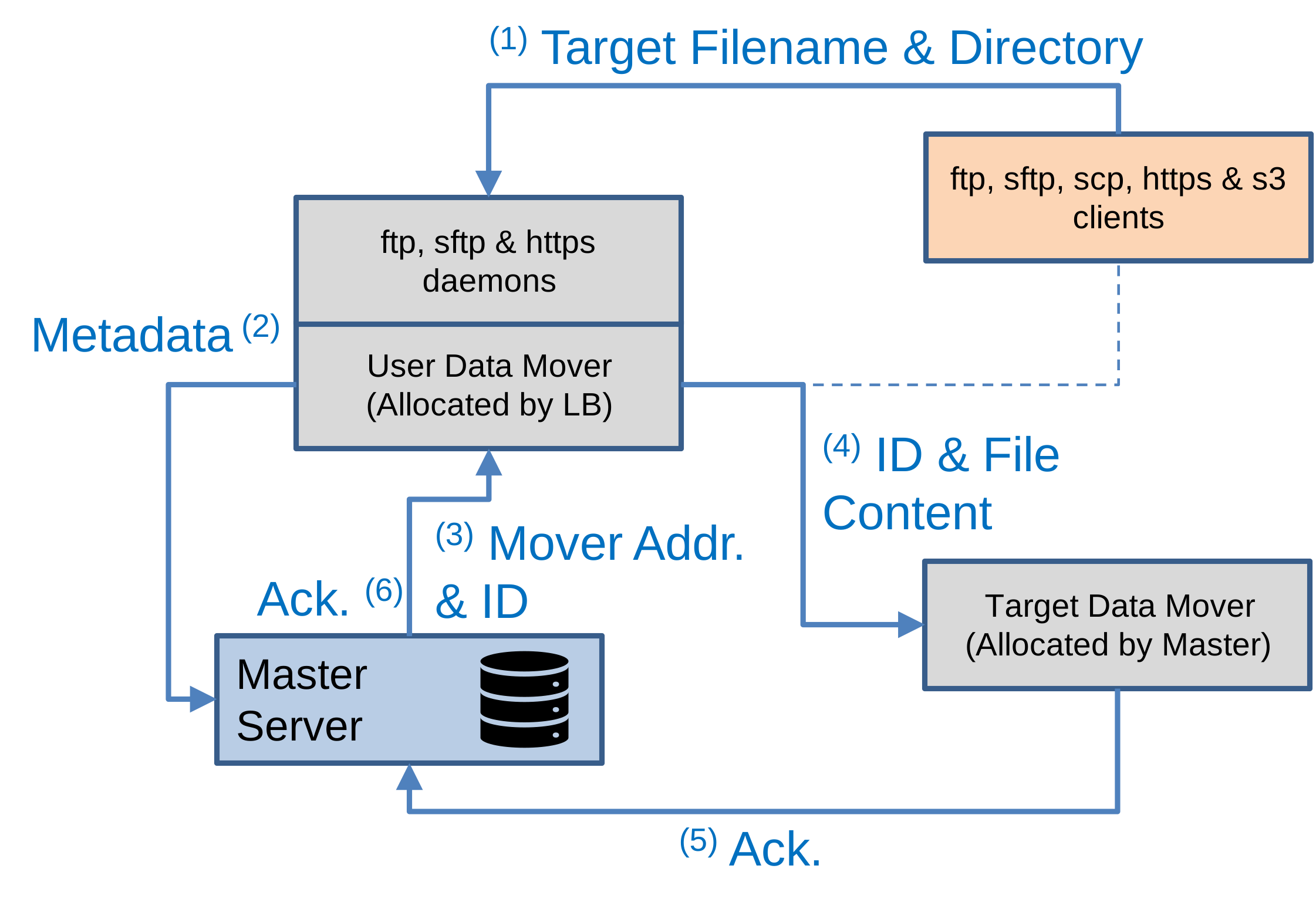
Workflow steps:
- The client connects to the User Data Mover via FTP, SFTP, SCP, HTTPS, WebDAV or S3 and uploads a file.
- The User Data Mover extracts the target path, filename, and metadata (e.g., user ID) and sends a request to the Master Server.
- The Master Server determines the target destination based on the filename and user configuration. It then assigns a DataFileID and selects a Target Data Mover.
- The User Data Mover connects to the Target Data Mover and streams the file directly from the client.
- Once the transfer is complete, the Target Data Mover sends an acknowledgment to the Master Server.
- The Master Server notifies the User Data Mover, which then closes the connection with the client.
Synchronous Pull
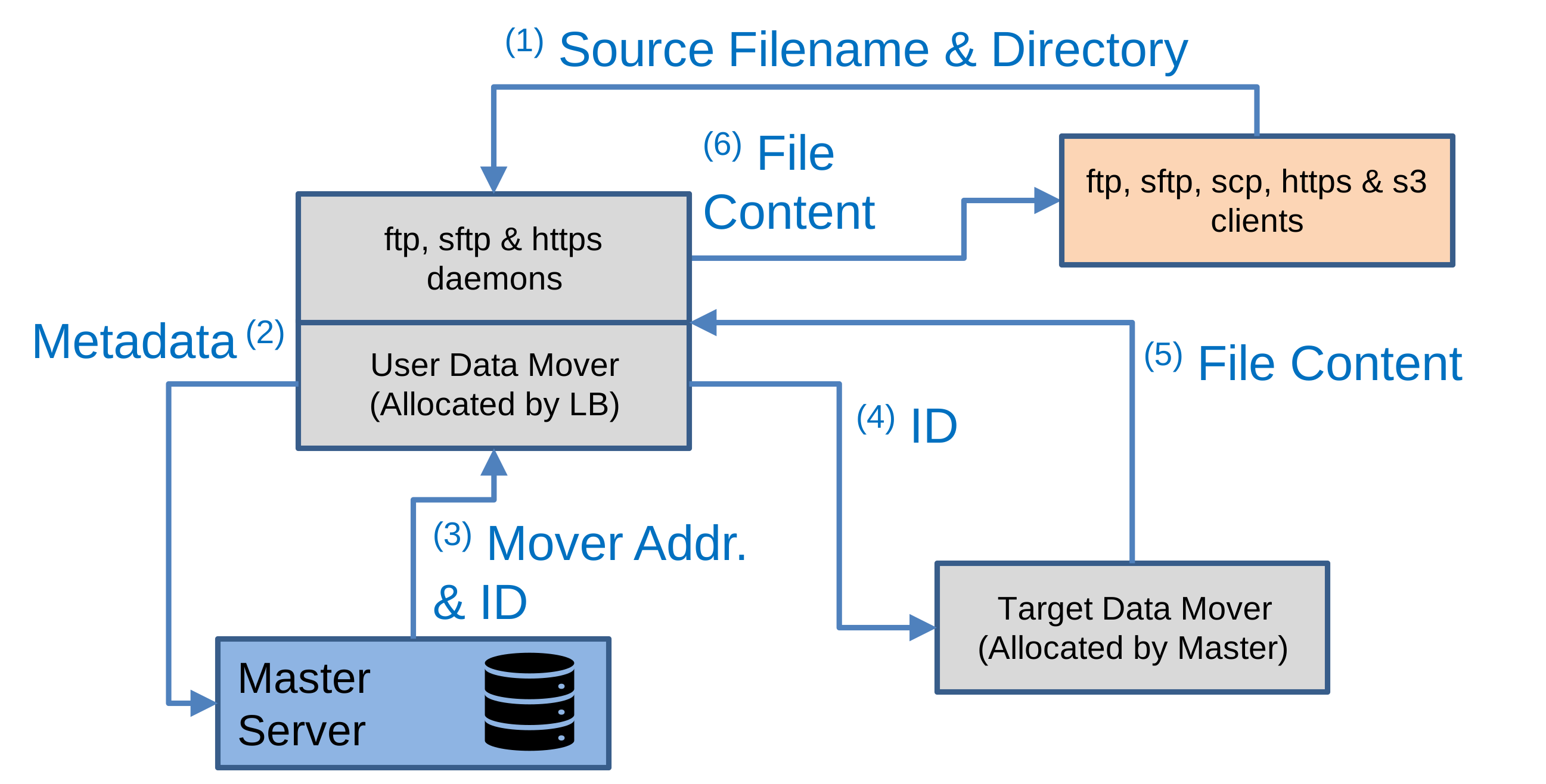
Workflow steps:
- The client connects to the User Data Mover via FTP, SFTP, SCP, HTTPS, WebDAV, or S3 and downloads a file.
- The User Data Mover extracts the target path, filename, and metadata (e.g., user ID) and sends a request to the Master Server.
- The Master Server determines the target destination and DataFileID based on the filename and user configuration, allowing it to locate the Target Data Mover where the data file is stored.
- The User Data Mover connects to the Target Data Mover and requests the data file using its DataFileID.
- The Target Data Mover streams the file content to the User Data Mover.
- The User Data Mover streams the file content directly to the client.
Related
- ECPDS command-line Tool
- System Messages — service-wide banners shown on the Data Portal
- Data Users — Portal Service modes, authentication, admin management
- Data User Options — per-user
portal.*configuration - Portal Transfer Module
- INH event fields — incoming history records
- DEA event fields — denied access records