Dissemination
After a file has been registered and stored in OpenECPDS — whether it was submitted and pushed via the ecpds command, uploaded through the Data Portal, or acquired via the Acquisition System — it can then be disseminated to a remote site via the Dissemination System.
Dissemination workflow
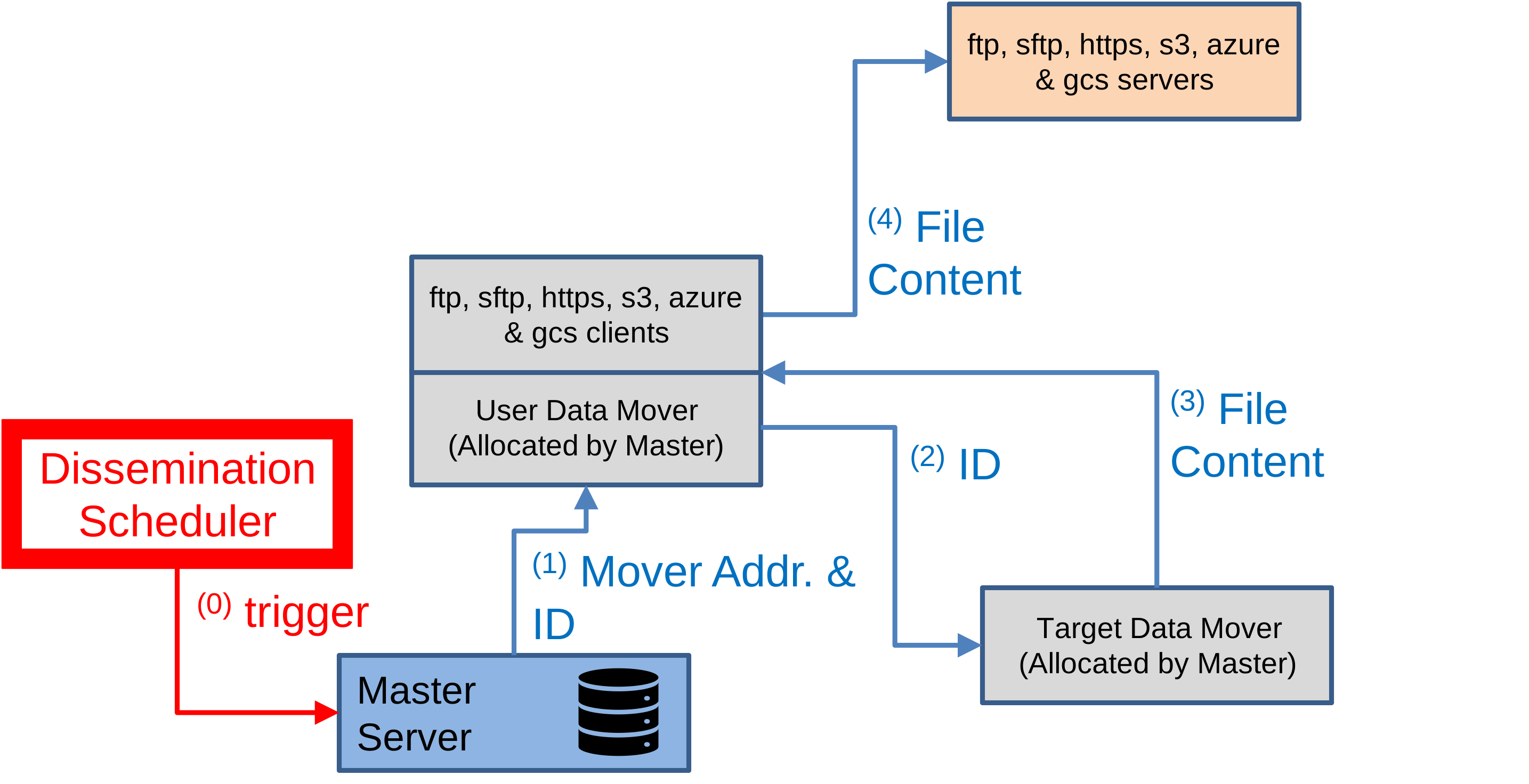
When a request for disseminating a file is triggered, the following steps occur:
- The Master Server allocates a User Data Mover to handle the dissemination of the selected file, providing the Data File ID and the address of the Target Data Mover where the file is stored.
- The User Data Mover forwards a request to the Target Data Mover containing the Data File ID.
- The Target Data Mover locates the file and returns a stream to allow the User Data Mover to download its content.
- The User Data Mover connects to the remote site using the configured transfer module and uploads the file's content directly from the Target Data Mover.
Scheduling, failover & retries
Dissemination is driven by the destination's transfer scheduler, which controls priorities, parallel transmissions, and a fully customisable retry mechanism. When a primary host is unavailable, the Failover Mechanism switches to fall-back hosts. The statuses a transfer passes through are described in the Lifecycle of a Data Transfer.
For geographically distributed delivery, see Continental Data Movers.
Related
- Acquisition
- Dissemination Directory
- UPH event fields — upload history records
- ERR event fields — dissemination errors