ECPDS command-line Tool
The ecpds command-line is designed to submit local data files to a specified destination on OpenECPDS. It provides several options to fine-tune transfer requests, monitor transfer statuses, and manage scheduled transfers. This page examines the workflow for submitting a local file in both synchronous and asynchronous modes.
Synchronous Push
This is the default mode for submitting data files to OpenECPDS. It allows both file transfer and metadata registration in a single execution of the ecpds command-line. Once OpenECPDS has successfully processed the file, it returns a Data File ID, which can be used to track the file via the OpenECPDS monitoring interface. The returned Data File ID guarantees that the file has been correctly registered and stored in the Data Store.
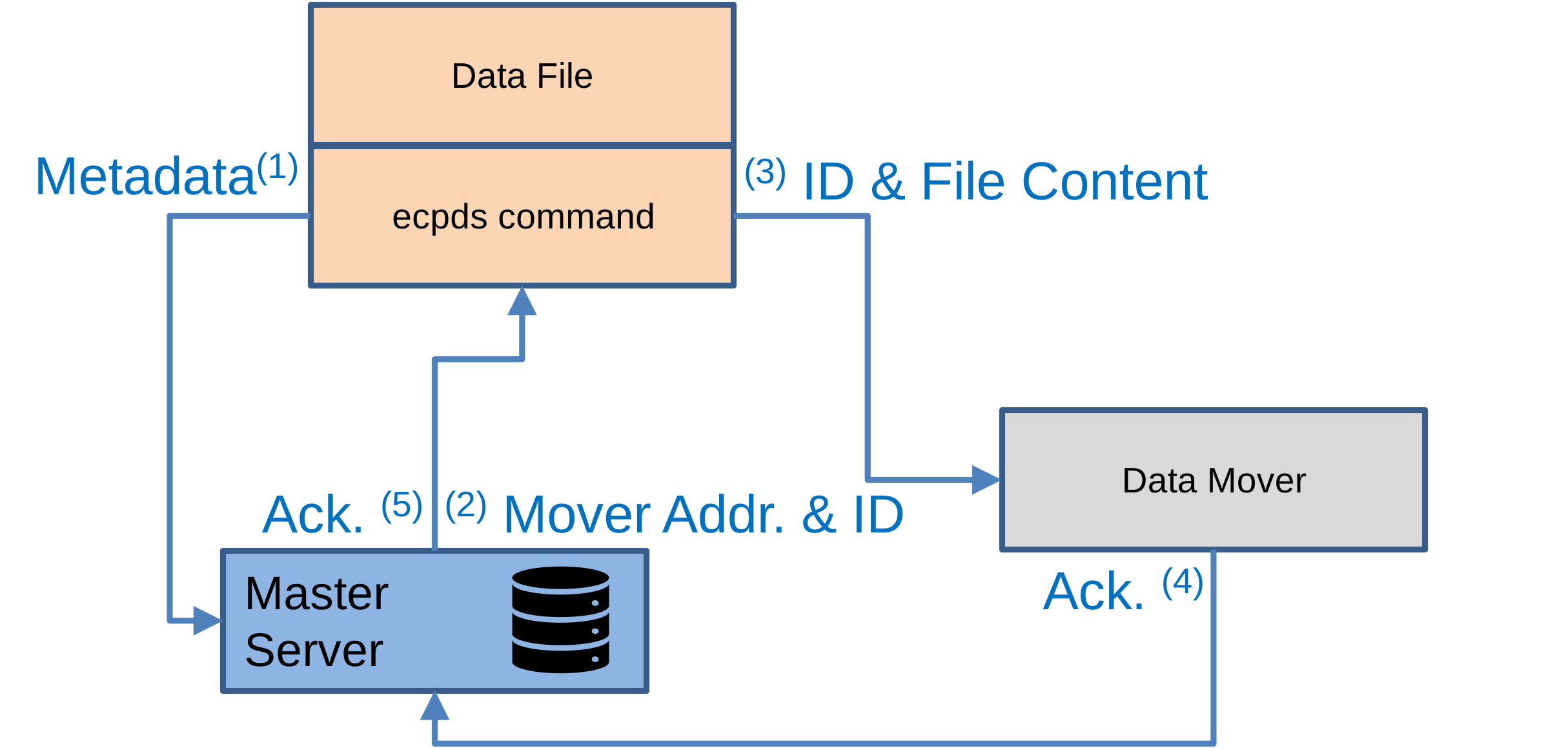
Workflow steps:
- The
ecpdscommand connects to the Master Server, authenticates, and sends metadata (e.g., source hostname, user ID, filename, location, size). - The Master Server allocates a Data File ID for the file and assigns a Data Mover to receive its content. It then returns the hostname and port of the selected Data Mover, along with the Data File ID, to the
ecpdscommand. - The
ecpdscommand connects to the Data Mover using the provided hostname and port and transfers the file content. - The Data Mover sends an acknowledgment of file reception to the Master Server.
- The Master Server sends the acknowledgment to the
ecpdscommand, including the Data File ID.
Asynchronous Push
The asynchronous mode is recommended when handling a large number of data files or high data volumes. In the first phase, metadata — including the file location and the source host for retrieval — is registered in OpenECPDS. In the second phase, OpenECPDS initiates the file downloads from the Data Movers. Typically, multiple files are registered at once, organised into groups, and retrieved in parallel streams managed by OpenECPDS. This approach enhances performance by using a load-balancing mechanism to distribute the workload across Data Movers and source hosts.
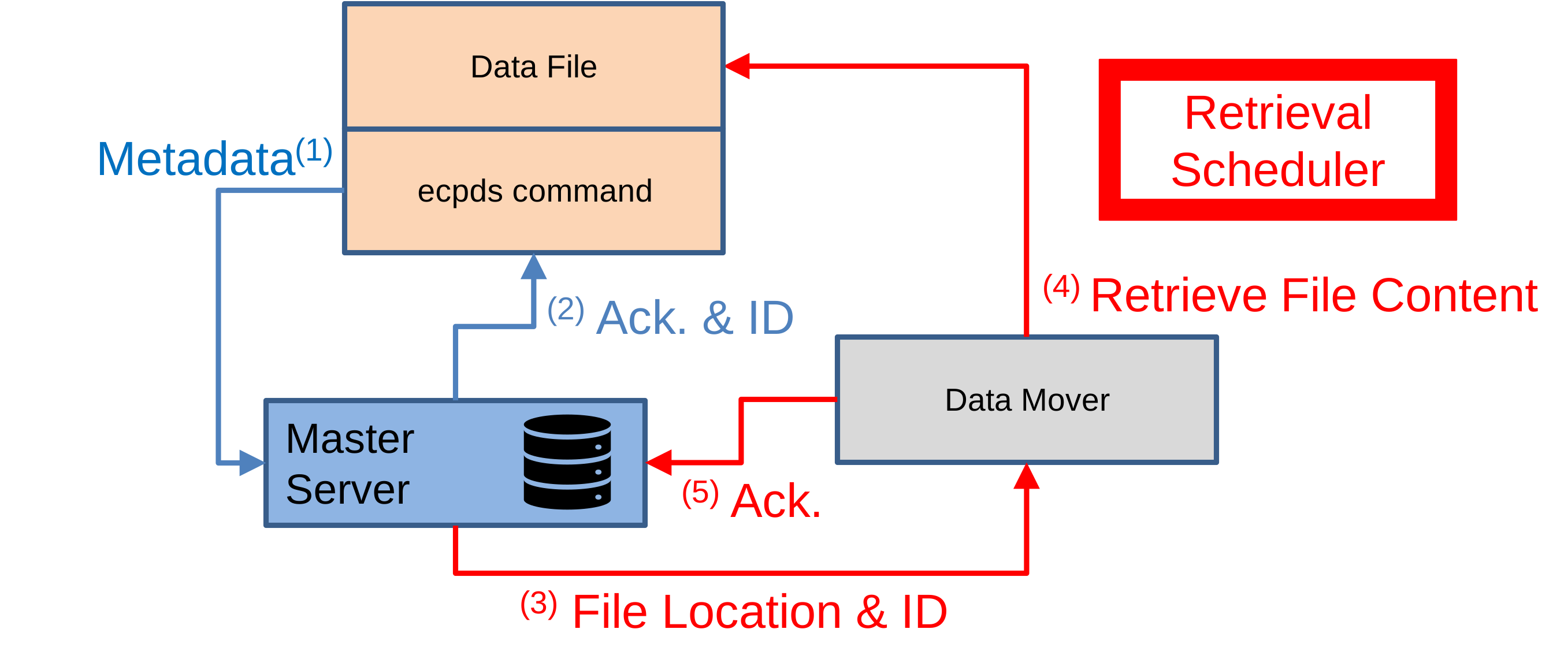
Submitting the request
- The
ecpdscommand connects to the Master Server, authenticates, and sends metadata (e.g., source hostname, user ID, filename, location, size). - The Master Server allocates a Data File ID for the file and assigns a Data Mover to receive its content. It then sends an acknowledgment to the
ecpdscommand, including the Data File ID.
Retrieving the file content
Triggered by the Transfer Scheduler:
- The Master Server contacts the allocated Data Mover and requests that the data file be retrieved.
- Using the provided metadata, the Data Mover connects to the source host with the user ID and retrieves the content of the file based on its filename and location.
- After the retrieval is successfully completed, the Data Mover sends an acknowledgment to the Master Server.
After submitting the request with the ecpds command, the status can be checked using the ecpds command and the Data File ID to track the data file retrieval. Tracking can also be done through the OpenECPDS monitoring interface.
Retrieval mechanism at ECMWF
At ECMWF, the forecast is produced and stored on the supercomputer (HPC) across multiple data nodes. Some submission tasks register these files with the OpenECPDS Master. The Master Server then records the requests, and the Transfer Scheduler asynchronously load-balances the data file retrievals across multiple Data Movers in each hall. This enables high parallelism between the HPC data nodes and the OpenECPDS Data Movers, maximising the use of the local network. The maximum number of simultaneous data retrievals is configurable in OpenECPDS.
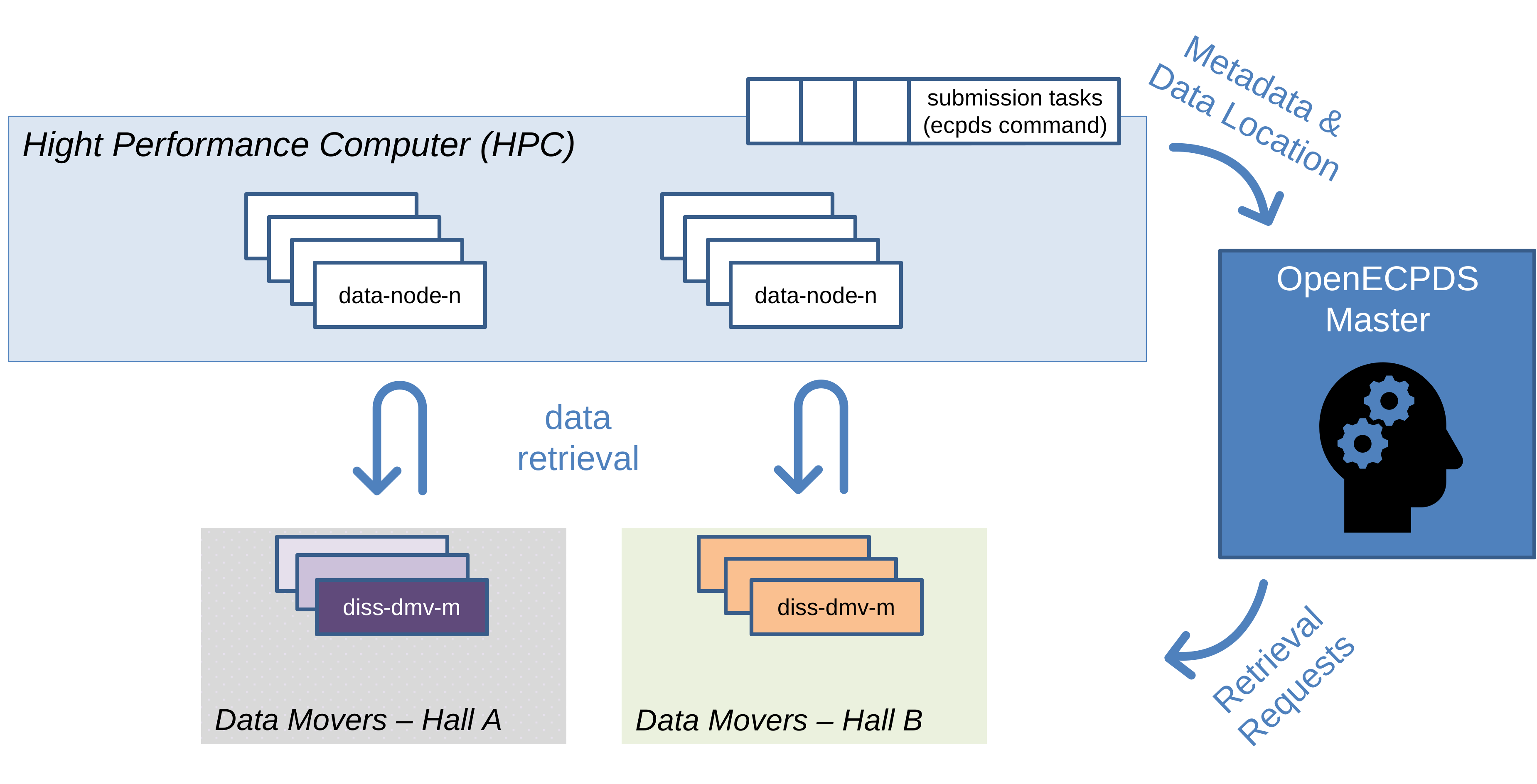
Data submission requests to OpenECPDS are grouped under a specific name. At the end of a batch submission, an ecpds command is executed to track the retrieval of all files in the group. Once all files have been successfully retrieved, the ecpds command returns.
Authentication
The ecpds CLI supports two authentication modes.
IncomingUser authentication (recommended)
Use the -user and -pass options to authenticate as an IncomingUser (also called a data user). The server:
- Validates the credentials against the OpenECPDS user database.
- Checks that the user is allowed to write to the requested destination.
- Checks that the user has the required permission for the target path, applying any path-regex filters configured in the user's properties:
putpermission for a normal submission or requeue (-source).deletepermission when purging a DataFile (-purge).
ecpds \
  -echost master.example.com \
  -user mylogin -pass mypassword \
  -destination MY_DESTINATION \
  -source /path/to/myfile.dat
This mode does not require a privileged (< 1024) source port, making it suitable for use from containers, CI pipelines, or any unprivileged environment.
Password security
Passing a password directly on the command line may expose it in shell history or process listings. Consider setting it via an environment variable or reading from a secrets manager and passing it programmatically.
ECUSER / privileged-port authentication (legacy)
When -user/-pass are not provided, the CLI falls back to the legacy mode: the server identifies the caller by their Unix username (obtained from getpwuid) and verifies that the connection originated from a privileged port (< 1024). This mode is only available to privileged processes (typically those running as root on a trusted host). It is the original ECMWF production mode and requires no password.
# Must be run as root or with CAP_NET_BIND_SERVICE on a trusted host
ecpds \
  -echost master.example.com \
  -destination MY_DESTINATION \
  -source /path/to/myfile.dat
The privileged-port check can be disabled server-side by setting ECpdsPlugin.checkPort=false in ecmwf.properties (useful for local development).
Shared-secret challenge-response (transport-level, optional)
Independently of the -user/-pass or ECUSER checks above, the connection between the ecpds binary and the Master Server can be protected by an additional, transport-level HMAC challenge-response. This runs before any application-level authentication and guards against a completely different threat: a network peer that can reach the Master Server's ecpds command port but does not hold the shared secret cannot open a session at all, regardless of which user account it claims to be.
This is the same challenge-response code path used by every plain-socket ecpds/ecproxy connection, not just the CLI binary's. In particular, the Master Server itself acts as a client of it whenever it pushes an acquired/notified file straight to a Data Mover (the internal ECpdsClient used by the Acquisition scheduler) - so a Data Mover must be configured with the same cliSharedSecret/CLI_SHARED_SECRET value as the Master Server whenever one is set, or those pushes will fail: the Master Server will sit waiting for a challenge the Mover never sends, until its socket read timeout ([ECpdsClient] soTimeOut, default 60s) fires and aborts the transfer. See Data Mover configuration below.
The protocol is symmetric with the one used to secure the mover/master REST control channel:
- On connection, the Master Server sends the client a random 32-byte challenge.
- The client computes an HMAC-SHA256 of the challenge using the shared secret and returns the 32-byte response.
- The server computes the expected response the same way and compares it in constant time. On mismatch, the connection is closed before any command is processed.
This mechanism is disabled by default and fully backward-compatible: if no shared secret is configured on the Master Server, the challenge-response step is skipped entirely and the connection proceeds straight to the IncomingUser/ECUSER checks above.
A separate secret from the mover control channel
This channel is configured with its own [Security] cliSharedSecret option, distinct from the [Security] rccSharedSecret option used by the mover/master REST control channel. The two protect unrelated connections (this one is a plain socket challenge-response, used both by the ecpds CLI binary talking to the Master Server and by the Master Server talking to a Data Mover; the other is an HTTPS/JSON relay between Proxy/Continental Data Movers and a regular Data Mover) and do not need to share the same value.
Server-side configuration (Master Server, ecmwf.properties):
As with the mover control channel, clisharedsecret.value is resolved from a JVM system property populated by the master startup script from the CLI_SHARED_SECRET environment variable (set in master.cnf, or via the CLI_SHARED_SECRET container environment variable in the Docker/Kubernetes deployments). See Mover Control Channel Security for the full rationale behind this indirection.
Client-side configuration (ecpds CLI binary):
The ecpds binary reads the shared secret from the same CLI_SHARED_SECRET environment variable name (though it is read directly by the C binary at runtime, not via the JVM indirection used server-side):
export CLI_SHARED_SECRET="dboUz95GH4U8LihvnJPGfBce5/rFJdbYXoZesRXBIyQ="
ecpds \
  -echost master.example.com \
  -user mylogin -pass mypassword \
  -destination MY_DESTINATION \
  -source /path/to/myfile.dat
Secret must match exactly
The value of CLI_SHARED_SECRET on every machine invoking ecpds must be identical to the Master Server's [Security] cliSharedSecret. A mismatch causes the connection to be rejected immediately, before the IncomingUser/ECUSER checks are even attempted.
Data Mover configuration (for Master-initiated pushes)
Whenever cliSharedSecret is set on the Master Server, every Data Mover it can push files to directly (e.g. for an Acquisition Host configured to submit the retrieved content inline, rather than scheduling it for later retrieval) must be given the same value, since the Master Server goes through this exact challenge-response as a client of the Mover's ecproxy port:
# mover.cnf, or the CLI_SHARED_SECRET container/environment variable
export CLI_SHARED_SECRET="dboUz95GH4U8LihvnJPGfBce5/rFJdbYXoZesRXBIyQ="
An unconfigured Mover fails silently, not immediately
Unlike a genuine value mismatch (rejected immediately, as above), a Data Mover that has no cliSharedSecret configured at all does not reject the connection - it simply never writes a challenge, because it does not know one is expected. The Master Server then sits waiting for challenge bytes that will never arrive, until its own socket read timeout ([ECpdsClient] soTimeOut, default 60s) fires. Symptoms are a SocketTimeoutException / "Communicating with ecproxy: ..." on the Master Server, a "Read error" - java.io.IOException: Connection closed on the Mover once the Master gives up and closes its side, and the affected DataTransfer(s) stuck in Arriving until they are -requeued, forced or purged - so always configure this secret on every Data Mover the Master Server can push to, not just on the Master Server itself.
Command-line reference
Run ecpds -help for the full option list. The most commonly used options are:
| Option | Description |
|---|---|
-echost <host> | DNS name or IP of the Master Server (default: localhost,host.docker.internal) |
-ecport <port> | Master Server port (default: 2640) |
-user <login> | IncomingUser login for authentication |
-pass <password> | IncomingUser password for authentication |
-destination <name> | Target destination name (required for file push) |
-source <file> | Local file to submit (default: stdin) |
-target <name> | Remote filename or directory (default: source filename) |
-priority <0–99> | Transmission priority (default: 99) |
-lifetime <duration> | Lifetime of the data file (e.g. 2d, 6h) |
-delay <duration> | Transmission delay before the file is dispatched |
-at <datetime> | Scheduled dispatch time (format: yyyyMMddHHmmss) |
-metadata <k=v,...> | Metadata key/value pairs |
-groupby <name> | Organise transfers into a named group |
-standby | Spool the file only (do not trigger dispatch) |
-asap | Send as soon as all files in the group are retrieved |
-force | Force re-registration when a duplicate DataFile is found |
-requeue | Requeue a DataFile and reset related transfers |
-purge | Remove a DataFile and all related transfers |
-verbose | Print verbose connection and transfer information |
Related
- Data Portal
- Dissemination
- Lifecycle of a Data Transfer
- PRS event fields — product status updates from
ecpds